When a catalogue search says "no results", the item is often there. Here is why catalogue search fails, what typo tolerance should actually mean, how to choose between running a search engine and using a managed one, and how Tomorrow Central Search handles catalogues of a few thousand items.
What does site search for a catalogue actually need?
Many "no results" pages on a catalogue site are wrong. Often the product exists, and the search box could not find it because the visitor misspelt one word, added a word the catalogue does not use, or typed a part number differently.
Good site search for a catalogue has a narrow job: return the right existing items for an imperfect query, quickly, and show you the searches that still fail. That needs four things:
- Typo tolerance that corrects against your catalogue's own words, not a general dictionary.
- Relaxation, so a longer query narrows the results instead of killing them.
- Control over what comes first for the searches that matter commercially.
- Reporting on searches, zero results and clicks, so failures are visible rather than silent.
For a catalogue of a few hundred to tens of thousands of items, none of that requires you to run a search cluster. It requires a clean catalogue file, a verified website and a way to measure the result. Tomorrow Central Search does this as a managed service, with a free plan to start on.
Why do catalogue searches return nothing when the item exists?
A catalogue is a store's product list, a publisher's titles, a distributor's parts list or a B2B price book. Each has its own vocabulary, and that vocabulary is exactly where generic search breaks.
The quickest way to see this on your own site is to take a sample of searches that returned nothing and check each one against the catalogue by hand. Where the item turns up, the content was never the problem; the search was the barrier.
The causes tend to be small and specific, and they show up in many catalogues:
| Failure | What the visitor sees |
|---|---|
| Every word treated as required | "latest carbon capture report" finds nothing, because no title contains "latest" |
| Correction from a general dictionary | A valid specialist term is "corrected" into an unrelated word |
| Short terms not indexed | "AI", "5G" or "EV" return nothing, because of a minimum word length default |
| Longer queries punished | The more precisely a buyer describes the item, the more likely the search fails |
Misspellings deserve a separate note. Baymard Institute's e-commerce search benchmark found that 69% of sites did not offer relevant autocomplete suggestions for closely misspelt queries (Baymard Institute, 2021 benchmark). Autocomplete is only the first place this shows: the same misspelling can fail on the results page too, so test both.
A zero-result search is the visitor telling you what they want, and your site telling them you do not have it.
The wider business case, including what unfindable inventory costs, is set out in why enterprise search is important.
What is typo-tolerant site search, and why is a dictionary the wrong source?
Typo-tolerant site search returns the intended item when the query contains spelling mistakes, swapped or missing letters, or a word the item does not contain.
The important detail is what the search corrects towards.
Dictionary correction vs catalogue correction
- Dictionary correction compares the query with a general language word list. It is fine for everyday words and wrong for a catalogue, because product names, brand names, drug names and part numbers are not in the dictionary, so valid terms get "fixed" into something else.
- Catalogue correction compares the query with the words that actually appear in your items. A correction can only lead to a word your catalogue contains, so it can only lead to something the visitor can buy or read.
The distinction matters most for technical and long-tail catalogues. Use dictionary correction for prose search, such as a help centre. Use catalogue correction for anything with product names.
Correction vs relaxation
Correction fixes individual words. Relaxation decides what to do when every word is spelt correctly but no item contains all of them. A sound relaxation rule drops the least informative words first and keeps the rarest word required longest, because the rarest word is usually the one that names the item.
On one live catalogue, the same engine cut zero-result searches roughly tenfold (measured differently before and after; see the case study).
Do you need a search cluster for a catalogue of a few thousand items?
Usually not. A catalogue of this size fits comfortably in a relational full-text index, and the engineering account of doing exactly that on MySQL is in building enterprise search on MySQL FULLTEXT. The real question is who carries the work around the index: the import pipeline, correction, ranking rules, reporting and keeping it all running.
| Option | What you run | Typo handling | Who owns quality | Fits when |
|---|---|---|---|---|
| Your platform's built-in search | Nothing extra | Varies by platform; test it with real misspellings | Mostly nobody | Small catalogue, few searches, basic needs |
| A self-run search engine | Servers, index pipeline, upgrades, monitoring | Configurable, but you configure it | Your team | You have engineers who want to own search |
| A hosted search API | Integration code and data sync | Often built in; check how it treats your terms | Shared: provider runs it, you tune it | You have developers and budget for a separate service |
| Managed catalogue search | A file or a website import, and a snippet | Corrects against your own catalogue | Provider runs it; you set rules and read the reports | No search engineer, a catalogue within the plan's item limit |
A self-run engine is the right call when search is a core engineering capability for you. For a business whose real job is selling or publishing, it adds an always-on system that someone must patch, size and watch.
What search problems does Tomorrow Central Search solve for a catalogue?
Each of these starts with something a visitor or a catalogue owner runs into, and ends with what changes once Tomorrow Central Search is in place.
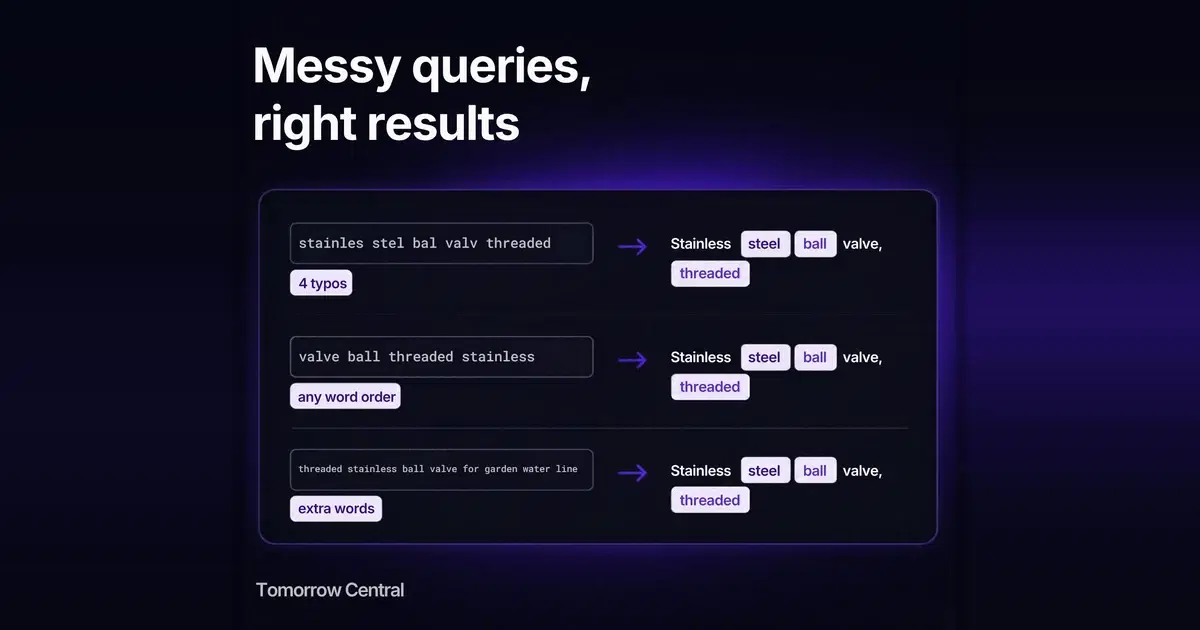
- A visitor misspells a product name. They still get the product. Corrections come only from words in your own catalogue, so a fix always points at something you actually sell.
- A visitor types the words in a different order from your title. "Valve ball stainless" finds the "Stainless ball valve", because matching is by word, not by phrase.
- A visitor adds words your catalogue does not use. "Latest stainless ball valve for sale" still returns the valves: extra words are dropped before the one that names the item.
- A visitor is still typing. Suggestions appear as they type, and the half-typed word is not "corrected" into something else mid-word.
- A key search has to show a key product first. For any search, you can pin up to three items to the top or hide items you do not want shown, and preview the results with and without your rules before they go live.
- You do not know what people fail to find. A statistics page shows top searches, searches that found nothing, what people clicked, how many searches were corrected and how fast results came back. Your own test searches are not counted, and you see only your own catalogue.
- Your catalogue lives in a store, a feed or a spreadsheet. Bring it in as a CSV or JSON file, a Google Merchant product feed, or an import of your verified website, including Shopify and WooCommerce stores. Rows that cannot be used come back with the reason, and each upload replaces the whole catalogue at once, so visitors never search a half-loaded one. Formats are covered in how to add search to a website.
- Search has to live on your site, and only there. Use the search box, a hosted results page, or your own page. Your search key works only on your verified website, so nobody else can embed your catalogue or use up your searches.
How do you switch on catalogue search, step by step?
In outline: prepare a file with a stable id, title and URL per item; verify your website; upload the file or import the site, and read the skipped-row report; test with real misspellings; set rules for your top searches; go live; read the zero-result report weekly. The full walkthrough is in how to add search to a website.
To see results from your own site before verifying it, start a trial on your website: it reads a sample of your pages, signed in only, and nothing goes live until you verify.
Signing up with Search selected switches it on for your organisation straight away, and the dashboard has a setup checklist to work through.
What should you check about security and data before going live?
Search is built for public catalogues. Once your website is verified, anyone on your site can search what you uploaded, so upload only what you would publish on a product page.
Delivery is locked to your own site. A search key (pk_...) belongs to exactly one search project and works only with Search switched on and your website verified. Browsers are allowed to call it only from that exact origin, so another site cannot embed your catalogue or spend your monthly searches.
Ownership is proved, then re-proved. Verification is by a DNS TXT record or a file at /.well-known/tc-verify.txt. Each website is verified separately, and a domain, worked out with the Public Suffix List, can belong to only one organisation. Verification is re-checked regularly, so leave the record or file in place.
The importer behaves like a polite crawler. It identifies itself as TomorrowCentral-Search-Importer/1.0, honours robots.txt, Crawl-delay and noindex, paces its requests, and treats an unreachable robots.txt as "do not crawl", as RFC 9309 requires. It only connects to public addresses, and follows redirects only within your verified websites.
Limits fail closed. On the current defaults, if a month's searches run out there is a grace of up to 10% more within seven days. After that, searches are refused until the next month and visitors see a short "try again later" message. Nothing is charged: a traffic spike uses up your allowance, it does not create a bill.
Example scenario: a 3,000-part industrial catalogue
Example scenario, not a customer case study. A distributor sells about 3,000 fittings and valves. Its store's built-in search matches exact words only. Buyers misspell "flange" as "flang" and "stainless" as "stainles", and type long descriptions such as "stainless 2 inch ball valve threaded".
The team verifies the domain with a DNS record, exports a CSV of id, title and URL from the store, uploads it, and reads the skipped-row report: 40 rows have no URL because they are discontinued, which is correct. They test 30 real queries from the old search log. Misspellings now resolve to catalogue words. The long description relaxes, keeping the rarest words, until the stainless threaded ball valves come back. They pin their best-selling model first for "ball valve" and paste the search box into the header.
A week later the zero-result report shows "PTFE tape" near the top. The catalogue sells it as "thread seal tape". That is a title fix, not a search fix, and it is the kind of finding the report exists to surface.
What are the most common mistakes with catalogue search?
- Judging search by the queries you would type. Your team knows the catalogue's words; your customers do not. Test with their spelling.
- Unstable item ids. Use the id your store or system already uses for each item, and keep it the same between exports, because every upload replaces the whole index.
- Titles that hide the main word. If the noun a buyer would type is missing from the title, no correction can find it.
- Never reading the zero-result list. The report is only useful if someone owns it.
- Pinning everything. Rules are for the handful of searches that carry revenue. Too many pins turn relevance into a manual job.
- Measuring searches when you mean intents. One person typing a word letter by letter is not five searches. Know which you are counting before comparing before and after.
- Uploading private data. Search is for public catalogues. Internal prices or stock notes do not belong in the file.
Is your catalogue ready for managed site search?
Use this as a readiness check before switching on:
- Every item has a stable id, a title and a public URL.
- You know roughly how many items you have, and it fits the item limit on the Search tool page.
- The catalogue is public: everything in it could appear on a product page.
- You can add a DNS record or upload a file to your domain, or you know who can.
- You have 20 to 30 real customer queries to test with, including misspellings.
- You know your three to five most commercially important searches.
- Someone will read the zero-result report each week.
- You know whether you need one catalogue or several, since the free plan holds one search project.
If most of these are true, a managed catalogue search is likely to cover the job without a search engineer.
Tomorrow Central Search comes in two forms. As SaaS, it is self-serve on Tomorrow Central, with a free plan to start on. For organisations that need it inside their own environment, it is also available on-prem: contact ITMTB about enterprise search.
What Tomorrow Central Search does not do
Being clear about the edges saves an evaluation:
- It does not let you edit synonyms yourself yet.
- It is not a general-purpose semantic or "chat with your catalogue" search. Retrieval is full-text matching with catalogue-sourced correction and relaxation.
- Each search project holds a limited number of items; the Search tool page shows the current limits. Very large catalogues need a different setup.
- It is for public catalogues on a verified website, not for internal documents or sites you cannot verify.
- The free plan's limits are defaults that can change, so check the tool page for the current figures.
Key takeaways
- "No results" is often a retrieval failure, not a missing item: check a sample of failed searches against your catalogue by hand before assuming the item is missing.
- Typo tolerance should correct against your own catalogue's words, not a dictionary, so it can only lead to items you actually have.
- Relaxation that keeps the rarest word required lets longer queries narrow results instead of killing them.
- For a catalogue of a few hundred to tens of thousands of items you do not need to run a search cluster; you need clean data, rules for key searches, and a zero-result report someone reads.
- Zero results fall when correction comes from your own catalogue and long queries relax: a retrieval change, not an infrastructure one.
- Test with your customers' spelling, not your team's.
Try it on your own catalogue
The Search free plan covers up to 5,000 products, 10,000 searches a month and one search project. Sign up with Search switched on, upload a file or import your verified website, search it with the misspellings your customers make, and read the zero-result report before anyone else does. The Search tool page lists the current plan limits.
Sources
- ITMTB enterprise search case study, ITMTB, 2026.
- Building enterprise search on MySQL FULLTEXT, Aakash Ahuja, 2026: the engineering account of the same engine.
- Why enterprise search is important, ITMTB, 2026.
- Offer autocomplete suggestions for misspellings, Baymard Institute, 2021: the 69% figure.
- On-site search UX articles, Baymard Institute (index of its search research).
- Validating a SaaS product with your first customer, Aakash Ahuja, 2026: how the search prototype was first deployed for one real customer, and what that taught the product.
- Boolean full-text searches and fine-tuning MySQL full-text search, MySQL 8.0 Reference Manual.
- RFC 9309: Robots Exclusion Protocol, IETF, 2022.
- Product data specification, Google Merchant Center Help.
Frequently asked questions
- What is site search for a catalogue (or product catalog)?
- It is the search box on a store, publisher or B2B catalogue website that finds items from that catalogue. Good catalogue search tolerates misspellings, handles long and technical queries, lets you control the results for key searches, and reports the searches that found nothing.
- What does typo-tolerant search mean?
- Typo-tolerant search returns the intended item when the query contains spelling mistakes or missing, swapped or extra letters. The best results come from correcting against the words in your own catalogue rather than a general dictionary, so a correction can only lead to something you actually sell or publish.
- Why does my store's search show no results for products I sell?
- Often because every word is treated as required, a misspelling is not corrected, or a short term such as a model code is not indexed. Checking a sample of failed searches against the catalogue by hand shows which of these is happening.
- Do I need Elasticsearch or a search cluster for a catalogue of a few thousand items?
- Usually not. A catalogue of up to tens of thousands of items fits in a relational full-text index. The harder work is the import, correction, ranking rules and reporting around the index, which a managed catalogue search runs for you.
- How do I get my catalogue into Tomorrow Central Search?
- Upload a CSV or JSON file with an id, a title and a URL for each item, use a Google Merchant RSS or Atom feed, or import your website once it is verified. The full procedure is in the guide on adding search to a website.
- Does my catalogue become public?
- Yes. Search is for public catalogues: once your website is verified, anyone on your site can search what you uploaded. The search key works only on your verified website, so other sites cannot embed your catalogue or use your searches.
- How much does Tomorrow Central Search cost?
- There is a free plan with up to 5,000 products, 10,000 searches a month and one search project. Nothing is charged; past the limit, searches pause until the next month. The limits are defaults and can change, so the tool page shows the current figures.
- Can I run Search on-prem?
- Yes. Besides the self-serve SaaS version on Tomorrow Central, Search is available on-prem for organisations that need it inside their own environment. On-prem is arranged through ITMTB: contact them via https://www.itmtb.com/enterprise-search.